Worlds best mobile and pc hacking tips&tricks....!

Showing posts with label Mobiles phone hacking tricks. Show all posts

12 March 2016

Best Tricks to Hack WiFi Network using Android 2016

The use of Wifi Network is common to all android users, and it’s also available on all android phones. Wifi network is actually a helpful tool for wireless connection to the internet with the use of radio-wave of 2.4Ghz and 5GHz SHF. Wi-fi can also be known as any wireless local area network (WLAN) product which is actually based on the Institute of Electrical and Electronics Engineering (IEEE) that is of 802.11 standard.
Today’s stroll, I would brief you guys on the 3 Best methods to Hack Wi-fi using Android Phones.
wifi+hacking+tools
Weeks back ago, I got lots of mails from most of my blog readers requesting for apps that could make them hack into any vulnerable wi-fi network amongst their area through the use of their android phones. With the tips I would be breifing you on, bet me, there is a 99.9% chance for any password protected Wi-fi network to be hacked.
3 Best methods to Hack Wi-fi using Android Phones
Method 1: Hacking of WPA2 WPS Routers
Step 1: Firstly, if your android phone isn’t rooted, try to root it, and also make sure that such android phone have a Broadcom bcm4329 or bcm 4330 chipest unlike the Nexus 7, Galaxy S1/S2, Nuxus 1, Htc Desire HD, etc. The presence of Cyanogen ROM on your device can be of use to make the bcmon app work through.


Step 2: Then download and install bcmon, it’s essential because it helps monitor mode on your broadcom chipest that helps in the PIN Cracking.
Step 3: After installation, run the app and tap “monitor mode” option.
Step 4: Download and Install Reaver app which helps to crack the WPS Pin to retrieve the WPA2 passphrase.
Step 5: After installation of reaver app, launch it and do an on-screen confirmation, which is, confirming that you’re not using it for illegal purpose, then tap the APN or access point you’d wish to crack and continue. Most times, you might need to verify monitor mode to proceed, and this would cause the bcmon to open again.
Step 6: Verify your settings and also make sure that you’ve checked the Automatic Advanced settings” box.
Step 7: Finally, start cracking process by tapping start attack, at this final stage, it can take 2-10hrs for the cracking of WPS to be successful.

Method 2: Hacking of WEP Routers
Step 1: Firstly, if your android phone isn’t rooted, try to root it, and also make sure that such android phone have a Broadcom bcm4329 or bcm 4330 chipest unlike the Nexus 7, Galaxy S1/S2, Nuxus 1, Htc Desire HD, etc. The presence of Cyanogen ROM on your device can be of use to make the bcmon app work through.
Step 2: Then download and install bcmon, it’s essential because it helps monitor mode on your broadcom chipest that helps in the PIN Cracking.
Step 3: After installation, run the app and tap “monitor mode” option.
Step 4: Then tap the “Run bcmon terminal” option and type “airodump-ng” and Enter. Once the airodump loads finish, you would be directed to the prompt command in which you’re to type “airodump-ng wlan0” then tap the Enter button.


Step 5: In this stage, a Mac address would appear, in which you’re to jot down.
Step 6: Start scanning the channel by collecting information from the access point before attempting to crack the password, then type, “airodump-ng -cchannel#–bssidMAC address-w output ath0” and tap enter, then it would start scanning, try scanning till it reaches 20,000 – 30,000 packets.
Step 7: To finally crack the password, return to the terminal, but make sure you’ve reached the suitable number of packets, then type “aircrack-ng output*.cap” and tap enter at the terminal.
Step 8: Once the password is cracked successfully, you would receive a message alerting,‘Key Found’ and would display the key in hexidecimal form. So when entering the key, make sure you eliminate the dots ‘.’ or double dots ‘:’, i.e if it displays 12:34:56:78:90, then enter 1234567890 as the code.
The use of osmino wifi app seems to be the best any easiest method when hacking into a wifi network. Actually, it doesn’t do any hacking but it serve as help to retrieve the already hacked password by someone else. It also tracks down the location of such vulnerability and gets connected it’s network.
To download osmino wifi app, click here.
DISCLAIMER: PLEASE I WON’T BE HELD RESPONSIBLE FOR ANY ILLEGAL ACTIVITY THIS TIPS IS USED FOR, IT’S JUST FOR KNOWLEDGE SAKE.

8 February 2014

Truecaller is very famous app
now a day and today I am going to
share how to fake people using
truecaller app. Many people feel
very happy & excited when they
come to know name of any
unknown number using truecaller.
But friends don’t be 100% sure
with the information you are
getting using this app. First of all
truecaller app use very poor
algorithm. It sync the name from
the phone on which it is installed.
Let me tell you working of
truecaller before I tell you the
hack.
Truecaller Working :
Suppose We both
have a common
friend Mr. ABC also
you and me have
already truecaller on
our phones. Now
suppose that you
have saved Mr.ABC’s
name as Mr.ABD and
I saved it as Mr.ABC
and one other person
saved Mr.ABC name
as Mr.ABC then
truecaller will get
maximum match of
Mr.ABC for same
number then it will
update the name
with maximum
matching results.
Okay now lets start the hack to
make people fool using truecaller
app
STEP 1:-
Recently Truecaller
introduce a new
feature to set your
own profile which
allow every user to
set his name against
his number after a
little sms
verification. You can
also do it just by
tapping on
ME option as shown
in below screenshot.
STEP 2:-
Now after that save
your profile with a
fake name , now call
to your friend who
do not have your
number on his
mobile. Now
truecaller will show
that fake name which
you set in previous
step to your friend
and your friend will
become fool.
Happy Hacking…

Hi friends, some day ago one of
my friend, Rahul showed me some
magical videos on his mobile.
When i saw it first time then i was
shocked to see that. I was thinking
that there should be an app to do
this magic. But when he told me it
is not as much complicated as i
am thinking. Then I asked him, how
did you do this, then i come to
know that it is very easy. I use my
phone camera to capture photos
and video recording daily but i
never tried to do it before. So
today now i am going to share this
trick with you.
Here are some steps as usual , have
a look on them.
STEP 1.
First of think yourself as a
magician and now you are trying to
hide a book from your hand.
STEP 2.
Now ask one of your friend to
open  video recording mode in
your camera
STEP 3.
Start video recording, and pretend
that you are trying to hide the
book.
STEP 4.
Ask your friend to pause the video
when the book in your hand.
STEP 5.
Now put the book anywhere which
can not be seen in video.
Take your position
STEP 6.
Now ask your friend to resume the
recording from where he stopped
it.
STEP 7.
Pretend that , you just hide the
book in the air.
Save the video and share it with
your friends..
Thanks to Rahul Verma to share
this trick with way2hacking.
This trick is performed on Nokia
S40 Series.
ENJOY & WAIT FOR NEXT

Well, Now a day everyone have at
least one nokia phone and know
that “what is bluetooth”. It is
very easy to Send/receive data via
bluetooth but here is a trick for
bluetooth you can called this
bluetooth trick as “BLUETOOTH
PRANK“
So how this prank works, let us
show you
STEP I –
First of all turn on
bluetooth of your
nokia phone
STEP II -
Now come back to
home screen of your
mobile
STEP III -
Then dial this code
*#9990#
STEP IV –
Now go back to
bluetooth menu and
try to turn off your
bluetooth. You’ll
surprised to see that
your phone’s
bluetooth is not
turning off…
ALSO CHECK: MOBILE SWITCH
OFF MAGIC
STEP V –
If you want to turn
off your bluetooth
then you have to
“SWITCH OFF” your
phone and again
“SWITCH ON” it,
After doing that go to
BLUETOOTH PANEL
and switch off your
phone’s bluetooth ,
It’ll switched off
Enjoy and play this prank with your
friends
[Note - This Prank works only in
NOKIA S40 PHONES (e.g. Nokia
3110c, Nokia C2-01, Nokia 7210
Supernova etc) ]

Hello friends, today I am going to
share a post to find your lost
mobile phone using IMEI number.
This post is shared by Sai Hackers
on my email id. Before I start let
me provide a little info on IMEI
number. IMEI number is short
form of international manufacturer
equipment identity. It is 15 digit
unique number. If you are using
call , SMS or gprs services on your
mobile handset then IMEI number
is helping you in this. Without IMEI
number you can’t use theses
services. I hope it is enough info
about IMEI number but still you
want to know more then Google is
alive just use it. OK now starts the
method shared by sai hacker to
find lost mobile phone using IMEI
number.
STEP 1:
First of all you need
15 digit IMEI number
of that mobile phone
which you have lost
sadly. You can find
your phone IMEI
number on your
phone bill as well as
box of your phone.
STEP 2:
Now note down that
IMEI number and go
to your email id
because we are going
to send an email.
STEP 3:
Now compose a new
email by providing
following info.
Your name:
Address:
Phone model:
Make:
Last used No.:
E-mail for
communication:
Missed date:
IMEI No.:
and send this email
to this email
id: cop@vsnl.net
Now just wait for reply from
cop@vsnl.net. If your phone in
use then they will trace it out
and inform you shortly.
REQUEST:
Friends, Its
my humble request
to all way2hacking
users that if by
chance you get
someone’s lost
mobile phone then
please return that
mobile to owner of
that mobile phone.
Just call back to last
dialed number or
search for home ,
papa , wife , son or
any relative’s
number in contact
list to return that
phone.
Once again, I Am really thankful to
Sai Hacker to share this useful post

Hi friends, Today I am going to
tell a new trick to test your TV/
DISH remote is working or not
workig using your mobile. Suppose
you are going to buy a new remote
then you can not take tv with you
so if you want to check the remote
is working or not working then just
follow these steps
STEP 1. - First of all take remote of
your tv and open camera of your
mobile.
STEP 2. - Focus the Remote’s IR-
LED(Infra Red Light Emitting
Diode) toward the camera of your
mobile and press any button from
your remote
STEP 3. – Now Here are two things
to be noted
if a light will appear in
your phone’s camera then
your Tv remote is working
if a light will not appear in
your phone’s camera then
your Tv remote is not
working
” ENJOY AND WAIT FOR THE
NEXT “

Hello, friends. Today I have a
magical trick for you. I hope this
trick will surprise your friends.
They will be shocked to see this
SWITCH OFF magic. Friends this is
very easy and simple trick.
Everyone can do it. Let me tell
you, how can you apply this trick
on your friends.
If you want to see this magic, then
just follow these simple steps…
STEP 1.
First Take two mobile phones, [e.g
one is your & the other one is of
your friend]
STEP 2.
Now call on friend’s number from
your own number.
STEP 3.
After doing step 2 , Just open back
panel of your mobile phone and
take the battery out form your
mobile phone. Please note that, Do
not disconnect the call before
removing the battery.
STEP 4.
Now you’ll notice that your friend’s
phone is still ringing after
removing the battery from your
mobile phone[i.e your phone is in
switch off mode].
So friends enjoy the tricks and
share us on facebook, if you like
this site.
[NOTE - This trick is 100%
working in INDIA, but I can not
say anything about other
countries, so if it is working in
your country then please
comment below with your
country name]
” Enjoy & Wait For The Next “

Hello friends, If you are using
SAMSUNG java enable phone, then
you have facing a problem while
installing any Java App (Game or
Software). The problem is that you
can not install any java app. of size
mre than 300KB, but don’t worry
friends I am going to introduce you
with my new trick to recover from
this problem, If you follow given
steps then you can install any java
app of size upto 1MB.
STEP 1. - First of all dial
*#52828378# [i.e. *#javatest# ]
from your samsung phone.
STEP 2. - Now you’ll see follow
menu
1. Trace Setting
2. OTA type setting
3. Serial test
4. Change Suitecache Flag
5. Memory Test
6. OTA Test
7. Memory Log Setting
STEP 3. - Now choose option no. 6
[OTA TEST ]
STEP 4. - Here you’ll see
“Maximum Jar Size (KB)” , just set
this value 1000 .
you have done, now you can run
any java app upto 1MB
” ENJOY AND WAIT FOR NEW “

As you know there are many java
apps based on java platform, so i
decided to collect some best java
apps for my websites visitor i.e.
For you.
I listed these apps with download
link and their working, so grab
these all and enjoy . .
Opera Mini [ Opera Mini is
mobile web browser, it'll
help to browse internet
very fast on your mobile]
Uc Browser [Uc is also a
java mobile browser, which
have more option like
download manager, pc
mode browsing etc.]
Adrees File Explorer [It is
app to explore you memory
card or phone memory]
eBuddy [Chatting App for
10+ Social Networking
Websites]
Facebook [Facebook Official
App]
FacebookChat [Facebook
Chat App By mSonar]
NewsHunt [App To Read
ePaper From Your Mobile]
Nimbuzz [Chatting App to
Chat on 10+ Social
Networking Websites]
QQBrowser [New Java
Enable Browser To Browse
Internet From Your Mobile]
iBrowser [New Java Enable
Browser To Browse Internet
From Your Mobile by Ibibo]
ZipUtility [App To Unzip Zip
Files From Your Mobile]
Nokia Nearby [GPS App For
Non GPS Phones]
Mobi Explorer [App To
Browse Bluetooth Phone &
Memory Card]

23 January 2014

A method of bypassing the iPhone lockscreen passcode has been discovered.
A video by YouTube user videosdebarraquito details the method which gives access to Contacts, Photos, and sending Email or SMS messages. How To: Slide to unlock Tap the emergency call button Hold the sleep/power button until the slider appears Tap cancel Dial 112 and cancel it ASAP before it can go through Lock the device using the sleep/power button Press the home button Slide to unlock Press and hold the sleep/wake button and in exactly 3 seconds tap the emergency call button. Take a look at the video below for a demonstration.

Tricks & Tips
Tip 1: Do u know how to use the edit button (abc or pencil button)? Heres how... in the inbox for example;
u wanna delete multiple sms, simply hold the edit button, scroll down, and then,
press c to delete the marked sms. The edit button can also b used to copy and past text in sms, simply hold it and scroll across, choose copy. pretty good for placing song names in ngages.
Tip 2: Shit happens, on a smartphone, its inevitable u do something wrong, and tis calls for a format of fone. to format the fone, press *#7370#, then enter the lock code, which is the sec code of the fone. NOTE: batt must b full, else if format is disrupted by low batt, consequences will b disatrous I heard the code *#7780# works too, pretty much the same i tink. for 6600 users, to format the fone, theres an alternative way. Press and hold <3>, <*>, and the buttons, then power on fone, keep holding on the 3 buttons, till u come to a format screen. tis method ONLY works on 6600, and need not enter the sec code. BUT sec code wun be reset to default 12345.
Tip 3: TO NGAGE USERS; Did u know u can install .sis files simply using the cable given? Juz plug it in, place the .sis file anywhere on e: (the mmc), not in any folders, root of e:, disconnect, then look for it in manager. Atitude Prince 8 June 2013 в 21:34
Tip 4: Save on battery and system memory being used by regulary checking the task manager which can be accessed by holding down the menu button!!
Tip 6: Type *#0000# to view which firmware version you are running
Tip 4a: Set the screen saver to a short time out period to prolong battery life.
Tip 4b: Avoid restarting the phone, or repeatedly turning it on and off. This helps increase battery life.
Tip 7: If you would like to avoid being "blue jacked", keep bluetooth turned off, or set your phone's visibility to hidden.
Tip 8: Don't want to carry a watch and a phone?
Set the screen saver to show date and time, then you can ditch the watch.
Tip 9: Save memory when installing apps, by installing over bluetooth. This can be done using the nokia phone suite and a bluetooth serial connection. Only works with .SIS files, so java still has to be sent to the phone, but will save space when using .SIS files. Atitude Prince 8 June 2013 в 21:39
Tip 10: Operator logos: Use a filemanager like FExplorer or SeleQ to add the folders: "c:/system/Apps/phone/oplogo". Add a .bmp picture to folder "oplogo" and restart your phone! The .bmp picture size needs to be: 97 x 25 pixels.
Tip 11: Check if the recepients phone is on Delivery reports. or Type *0# your message in the message composer window space then write your message, the recipient will not see the star zero hash bit - just the message When they read it it will relay a message back to your fone showing the time they recieved it. (haven't yet tried it myself though)
Tip 12: Blue Jacking First up, you need to know what Bluetooth is. There are lots of types of modern devices that incorporate Bluetooth as one of their many features. PDAs, mobile phones and laptops are a few of these modern devices. Bluetooth means that Bluetooth enabled devices can send things like phonebook/address book contacts, pictures & notes to other Bluetooth enabled devices wirelessly over a range of about 10 metres. So, we've got past the boring part. Now, using a phone with Bluetooth, you can create a phonebook contact and write a message, eg. 'Hello, you've been bluejacked', in the 'Name' field. Then you can search for other phones with Bluetooth and send that phonebook contact to them. On their phone, a message will popup saying "'Hello, you've been bluejacked' has just been received by Bluetooth" or something along those lines. For most 'victims' they will have no idea as to how the message appeared on their phone.

22 January 2014


How to Spoof Caller IDCaller ID spoofing is the act of making the telephone network to display any desired (fake) incoming number on the recipient’s Caller ID display unit instead of the original one. With this, it is possible to make a call appear to have come from any phone number that the caller wishes.
Have you ever wondered to know how to perform this? Well, read on to discover more information on how to spoof Caller ID and play prank on your friends.
Unlike what most people think, an incoming call may not be from the number that is displayed on the Caller ID display unit. Because of the high amount trust that the people have in the Caller ID system, it is often possible for the caller to easily fool the call recipients and make them believe that the number displayed on the Caller ID display is real. This is all possible through the technique called Caller ID spoofing.

How to Spoof Caller ID?

You can easily spoof any Caller ID using services like SpoofCard. In order to use the spoofcard service, you need to pay in advance and obtain a PIN (Personal Identification Number) which grants access to make a call using the Caller ID spoofing service. Once you have purchased the service, you will be given access to login to your SpoofCard account. To begin with, you need to call the phone number given by the SpoofCard service and enter the PIN. Now, you will be given access to enter any phone number you want to call and also the number you wish to appear on the recipient’s Caller ID display unit.
Once you select the options and initiate the calling process, the call is bridged and the person on the other end receives your call. The receiver would normally assume that the call was coming from a different phone number (the spoofed number chosen by you), thus deceiving the recepient into thinking that the call was coming from a different individual or organization than the caller’s. In this way, it becomes just a cakewalk to spoof Caller ID and fool the receiver on the other end. SpoofCard also provides an option to change the tone of your voice so that it can appear as a male or a female voice.
Thus, you neither need to be a computer expert nor have any technical knowledge to spoof Caller ID. For more information on this service, you can visit the SpoofCard website from the link below:
SpoofCard – Caller ID Spoofing Service

How Caller ID Spoofing works?

Caller ID spoofing is done through various methods and using different technologies. The most commonly used technology to spoof Caller ID is VOIP (Voice Over IP) and PRI (Primary Rate Interface) lines.
Today, most VOIP systems provide an option for its users to enter whatever number they want in the calling party field and this number is sent out when they make a call. Hence, it is easily possible for any user to spoof Caller ID provided they have a VOIP system and know how to properly configure it to spoof the Caller ID. However, sites like SpoofCard provide an easy and cheap spoofing services for those who aren’t using VOIP systems that they can configure themselves.
Caller ID spoofing is possible and being performed right from the days Called ID system was introduced. However, most people are unaware of the fact that it is possible to spoof  Caller ID and make any number to be displayed on the receiver’s end. In the past, this was mostly used by telemarketers, collection agencies, law-enforcement officials, and private investigators. But today, it is available to any Internet user who wish to do this.

Trace Mobile NumbersWith the rapid growth of mobile phone usage in recent years, it is often observed that it has also become a part of many illegal and criminal activities. So, in most cases tracing the mobile number becomes a vital part of the investigation process. Also, sometimes we just want to trace a mobile number back to the caller for reasons like annoying prank calls, blackmails, unknown number in a missed call list and so on.

How to Trace Any Mobile Number?

Well, there are several ways to do this. The easiest way to gain access to the details of any mobile number is by using a reliable paid service that has records of over millions of mobile and landline users in its database. If you’re really serious to find out the name and address of the person behind the mobile number, then this is the right choice. You can use the following service to get the details of any phone number (mobile and landline):
Cell Phone Registry – Trace Any Mobile Number
Please note that the above service works only for the “United States” telephone numbers.

Other Possible Ways to Trace a Mobile Number:

Now let us look at some of the free options that are available. Even though it is not possible to trace the number back to the caller using the free services, it is possible to trace it to the location of the caller and also find the network operator. Just have a look at this page on tracing Indian mobile numbers from Wikipedia. Using the information provided on this page, it is possible to certainly trace any mobile number from India and find out the location (state/city) and network operator (mobile operator) of the caller.
All you need for this is only the first 4-digit of the mobile number. In this Wiki page you will find all the mobile number series listed in a nice tabular column where they are categorized based on mobile operator and the zone (state/city). This Wiki page is updated regularly so as to provide up-to-date information on newly added mobile number series and operators. I have used this page many a time and have never been disappointed.
If you would like to use a simpler interface where in you can just enter the target mobile number and trace the desired details, you can try this link from Numbering Plans. With this, you can trace any number in the world.
UPDATE: After the introduction of Mobile Number Portability (MNP) in India, methods discussed above are not found to be very much accurate.
By using the above free services, you can only know “where” the call is from and not “who” the caller is. Only the mobile operator is able to tell you ”who” the caller is. Unfortunately in India, there is no such paid service that gives you more accurate details about the caller. So, if you are in an emergency and need to find out the actual person behind the call, I would recommend that you file a complaint and take the help of the police. I hope this information has helped you!
Spy on BBM Messages
Just when we thought that BlackBerry was dead and gone, or perhaps on its last breath, the BlackBerry Corporation (formerly known as Research In Motion) released a new series of handsets at the beginning of the year with the latest version of their OS the BlackBerry 10 OS. As soon as the set was released the initial worldwide reception was enough to get just about any BlackBerry critic to admit the comeback.
So BlackBerry sets are being seen sported around again which consequently means that the company’s legendary BlackBerry Messenger service is kicking and roaring back into action. The service is an in platform messaging software which allows individuals who use the BlackBerry platform to communicate with each other through messages without incurring any extra data plan or package fee. If someone close to you owns a BlackBerry then you will be only too familiar with this service and might also get the itch to read the messages that are being exchanged. Whether you are a concerned parent or suspicious spouse, to know what’s happening in their life, you must know how to access their BBM messages. Here is how to go about it.
1. Look For BBM Spy Software: In order to get into their BBM messages, you will need the help of specially designed software that can retrieve the desired data. However, there is a dearth of good programs that will specifically target the messaging service. Many apps will allow you to access phone conversations or call logs but not the actual messages exchanged in BBM chat. So when looking for software to use, make sure it specifies itself as a Blackberry Spy app.
2. Evaluate the Options: Once you find software that can access BBM messages, pick one that suits your needs the best. If you are unable to figure out any at all, then there are two good apps for starters that you can try. Spyera is a good option that solves many problems when it comes to spying. With this one you can access BBM conversations, emails, texts and even ongoing phone calls. You can also try MobiStealth spy software. Like Spyera you can use it to access BBM messages, videos and photos but not live calls. Both of them allow for the user to monitor the target BlackBerry remotely. With MobiStealth you can receive the data from an online dashboard or private email account.
3. Download and Install: Once you have decided on BBM spy software, you need to purchase it. In order for it to work it needs to be accessed from the target’s phone. That means you must physically retrieve the BlackBerry you wish to monitor and access the Internet. Stealth would be required on your side of course. After that you proceed to downloading it from the source site. Once download is complete, begin the installation process. Once the notification of installation completion appears, you can be sure that the spy software is successfully in place. Simply wait for conversations to take place and then monitor them!

Make ur Memory Card invisible Get to ur Memory.card folder.
Then options rename memory card. Then write wat u want to write Then .otb (for eg:- name.otb) instantly ur memory card wil be invisible.
Warning:
I will not be hold responsible if ur memory got damaged or formatt, use this only if u want 2 wicked pple.
If u want 2 make it visible just use x-plore or blueftp and rename it back.

Now You Can Copy Your Friends Message Inbox In Your Mobile.. Just Follow Below Very Simple Steps:-
1. Turn on your and your Friends bluetooth .
2. Go To Settings> sync and backup> phone switch> copy to this.
3. Where They Ask to Select otherdevice, Then Select new phone .
4. Now You Can See List Which Item You Want To Select Mark It. You can also copy MMS , NOTE , Contacts .
5. Press Done And Search the device .
Connect with it .
Done. Your Friend Inbox Copied Succesfully ..
Enjoy And Use This Trick With Your Friends

default user code: 1122, 3344, 1234, 5678

Engineer mode: *#110*01#

Factory mode: *#987#

Enable COM port: *#110*01#

Restore factory settings: *#987*99#

LCD contrast: *#369#

software version: *#800#

software version: *#900#

set default language: *#0000#

set English language: *#0044#

More some codes for reset mobile china

*#77218114#

*#881188#

*#94267357#

*#9426*357#

*#19912006#

*#118811#

*#3646633#

20 January 2014

Nowadays there are some application which are not upgrading their newer version for Symbian and Java mobile phones due to which such application will display “certificate expired” and won’t install. There are some applications which are really good and we want to install them but this error is problem for installing these application. 
I also faced lot problem due to this error but now I have got solution for this problem and these applications can be easily installed on mobile phones. This error is due to privacy concern of Nokia mainly in Symbian OS, which don’t allow you to install any application older than 6 months. There are two way which may help you to install these applications.
Method 1:
You will need to change the date of your mobile phone nearer to application release date. Of course you can change the date but I am going to show process just in case.
·         Go to Menu – Tools – Settings – General - Date and time – Date
·         Change Date nearer to the date application was released [ if you don’t have information of date it was released then keep changing it at the difference of six months]
·         The application should install when you set the date not more than it’s date of release
Method 2:
You have to change software installation to “All” from “Signed only”. In this case application is new but it won’t install as your setting is set to install only applications having valid certificates. This may cause application not to install as some application don’t have certificate attached to them.
·         Go to menu – Installation – App. Manager
·         Open Options – Settings
·         Open “Software installation”
·         Select “All”
Note: Process may vary depending on model of phone.
Now try installing application it should install. Hope it helps to solve your problem.
Many time we want to format our mobile phones due to virus or any other bug to reset our phone and remove the bug or virus. It is recommended to take backup of your data in phone memory and external memory before you format your phone as all the data will be erased and due to which you may lose some important files.
It is quite easy to format your Nokia Cell Phones, just a small procedure but yet you should be careful and sure about you want to reset all the functions and data of your cell phone.

Note:
  • Make sure your battery is fully charged, if formatting is disrupted then your phone will be unusable
  • This procedures are applicable for Java and Symbian Nokia Phones
First Procedure:
  • Go to your home screen of your cell phone
  • Type *#7370# if this won't work type *#7780#
  • Enter the phone security code
  • Your cell phone will restart
Second Procedure:
  • Switch off your cell phone
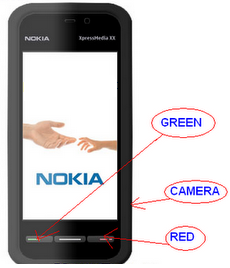
  • Press *,3 and dial button (Green button) at once  for model like Nokia 5800 XpressMedia  you need to press camera, red and dial button
  • Switch on your cell phone
  • Your phone will be formatted while it starts
This procedure is helpful for formatting phones when your phone don't even starts.
COOL NOKIA s40 TRICKS(u'll love it)
[1] Hide your Folder Icon in Nokia S40 mobile. Rename ur folder with .ota extension (for ex. Rename Folder1 to Folder1.ota)
[2] Decorate your mobile gallery in Nokia S40. Rename your folder to .nth extension. (For Ex. Folder.nth )
[3] Increase volume of radio and Music Player in nokia s40. Go to setting >> enhancement setting >> use text phone > turn it to YES
[4] Want to hang your friends mobile. Go to your message editor, write any 25 letters followd by dots....... Like this.. Dots should be more dan 120. Now send this msg to ur frnd., n see magic ( Work with only s30 mobiles like 1100, 1110, 1208, 2100 etc.)
[5] Hide Folder without any Software in Nokia S40 phones This trick is very simple friends.You don’t need any thing for this trick. Just simply follow the steps and your work will be done. *. Create a folder of any name like abc. *. Move the files you want to hide. *. Now just add the extension .jad like if you have abc folder rename it to abc.jad. *. Now create another folder in same directory with the same name but different extension of .jar. (example abc.jar) *. now your main folder will hide and it will not be shown. To simply see the original folder rename the visible folder and your hidden folder will appear. This trick is tested and is free from any side effect.so enjoy hiding your private data.
[6] Minimize your s40 nokia mobiles.Open any application and hold press the volume + key. Thants it now your application is minimised.. Enjoy
[7] Copy Copyrighted Tones,Games and Themes in Nokia S40. 1. Go to Nokia's Default Browser. How to Open Default Browser. Go To. Music Player--> Options--> Downloads-- > Go To Address--> Erase rtsp:// 2. Copy the following Commands: For Themes: file:///c:/predefgallery/ predefthemes/ Black.nth For Tones: file:///c:/predefgallery/ predeftones/ predefringtones/Nokia Tone.aac

Blog Archive

Contact Us

About Us

Privacy Policy

Copyright © The Way oF HacKeRs....! | Powered by Blogger
Design by Crackiapps | Blogger Template by Crackiapps.blogspot.com